Response Behavior
The Response Behavior step (Step 7 in the Edit AgentCard wizard) controls how your mock agent responds to incoming messages.
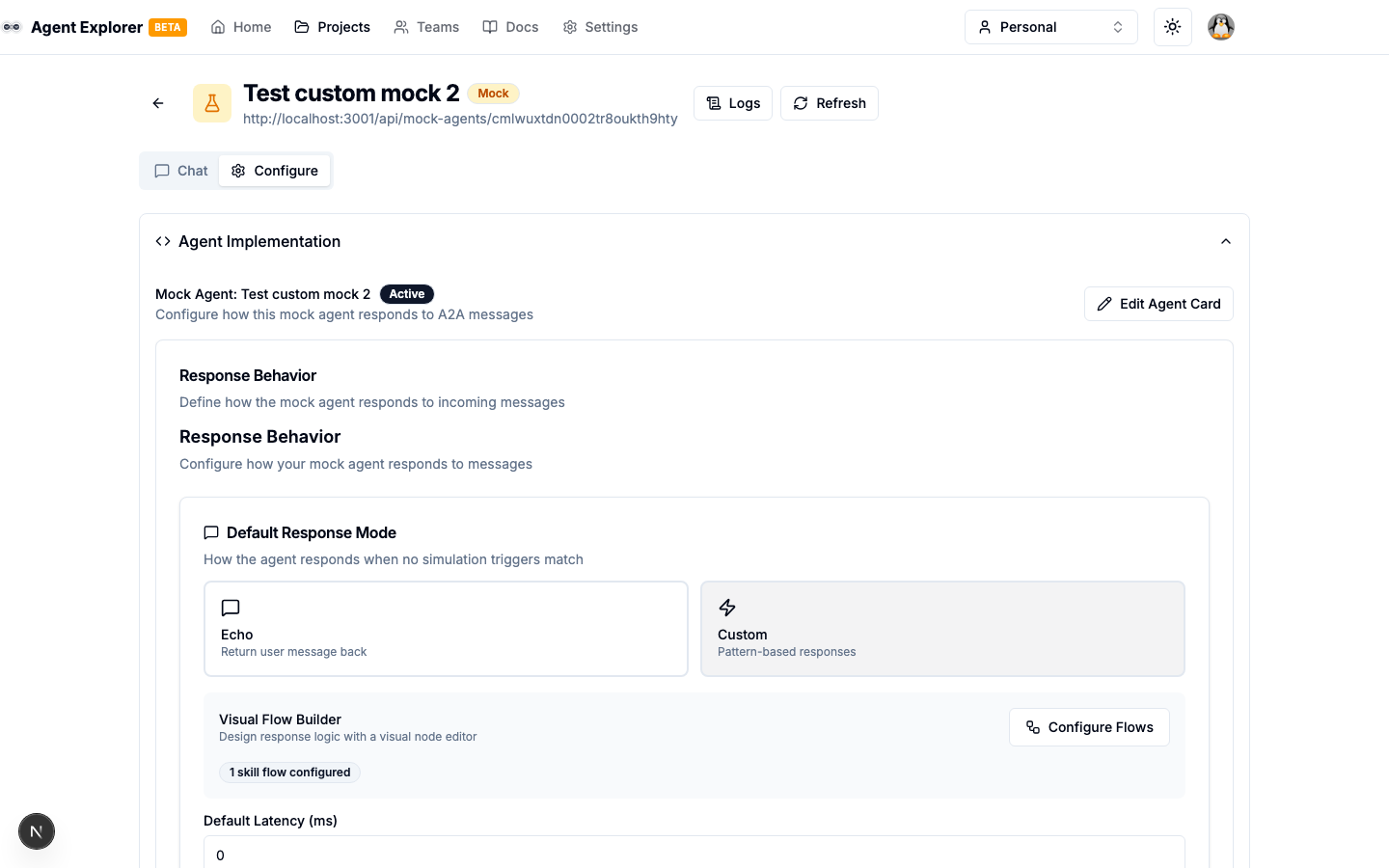
Response Presets
Open Configure → Response Mode or Flows to answer What should this mock agent say? Existing values are shown in the form:
- Fixed reply — return the text you enter.
- Echo — return
Echo:followed by the incoming message. - Conditional reply — define ordered rules with one or more conditions and a reply for each rule.
- Error — simulate a failure.
- Custom flow — an existing graph that needs the visual editor. Choose Edit in Flow Builder to keep its full behavior.
Click Save response to apply your changes. Changing a response type or replacing a custom flow requires confirmation. Opening the editor does not change saved configuration.
Single-skill agents show their active response directly. If an existing skill has its own flow, its separate fallback remains available under Advanced settings → Edit fallback response.
For multiple skills, start with Use the same response for every skill. Choose Different responses by skill to see which skills use the shared response and which have a custom response. Customize or Edit affects only the selected skill; Use shared response removes that customization after confirmation. Existing routing settings and other flows are preserved.
Edit in Flow Builder opens the selected response in the Flow Builder. Pending form edits are saved first, including conditional rules and ALL/ANY branches, so the graph matches the form. Replacing a saved response type still asks for confirmation; failed saves or invalid rules keep you in the form. Saving has a 15-second limit for an earlier pending write and a separate 15-second limit for the new request. Connection, sign-in and timeout errors preserve your draft so you can retry; the builder opens only after a successful save. If nothing has changed, opening the builder does not save anything.
Flow Builder shows the selected response in its heading, with tabs for Shared response and each skill. Switch tabs to edit another skill without leaving the builder; pending edits are saved when switching. Skills marked Uses shared response show the shared graph without creating a custom response just by viewing it. Editing that graph creates a response for that skill only. Back to response returns to the simple editor with the same skill selected. Existing custom skill flows are shown automatically, and unrecognized saved flows remain available under Advanced settings.
Conditional replies
Rules are checked from top to bottom. The first matching rule supplies the reply; later rules are skipped. Use the up/down arrows to change priority, Add rule for another reply, and Otherwise for the fallback when no rule matches.
Each rule supports ALL conditions (AND) or ANY condition (OR). Use Add condition to combine comparisons within that rule. For example: message contains “order” AND does not contain “cancel” → “Let’s check your order.” A second rule can handle cancellation requests.
Available comparisons: Contains, Does not contain, Equals, Does not equal, Starts with, Ends with, Is empty, Is not empty, Greater than, Less than, and Matches regex (under Advanced). Text matching is case-sensitive. Empty checks also treat whitespace-only input as empty. Numeric comparisons use the leading number in the input, so “12 items” compares as 12; input without a leading number does not match. Regex uses JavaScript syntax without slash delimiters or flags, for example ^order-[0-9]+$. Invalid regex or missing comparison values prevent saving and testing.
Enter a Sample message and click Test message to see the matching rule and its reply. This evaluates the current draft without saving, creating a conversation or sending a request. It tests response rules only; skill routing, authentication and simulation settings still need a test through the agent’s Test page. Editing the sample or rules hides the previous result until you test again. Sample tests stop after two seconds if an expression takes too long, keeping the editor responsive.
Click Save response to apply the rules. Existing single-condition replies open with their original condition and text, and are never rewritten just by opening or testing them. Supported rule graphs remain editable after opening them in Flow Builder. Extra nodes or other custom behavior remain available as Custom flow. Adding conditions or changing the group structure can regenerate the graph layout; editing values within the same structure preserves node positions and labels.
Default Latency
Set an artificial delay (in milliseconds) added to all responses. Range: 0–10,000ms. Useful for simulating slow agents or testing loading states in your client.
Simulation Features
Simulation features are keyword-triggered behaviours that override the default response mode.
Error Simulation
When enabled, any message containing a trigger keyword returns a JSON-RPC error response.
Configuration:
- Trigger Keywords — Comma-separated list (e.g.,
error, fail, crash) - Error Code — JSON-RPC error code (default:
-32000) - Error Message — The error message string
Example: Sending "please fail" returns:
{
  "jsonrpc": "2.0",
  "error": {
    "code": -32000,
    "message": "Simulated error"
  }
}
Delay Simulation
When enabled, the command "delay N" in a message adds N seconds of delay.
delay 3— adds a 3-second delay- Maximum delay is configurable (default: 10 seconds)
Status Simulation
When enabled, the command "status STATE" in a message sets the task state to STATE.
Supported states: working, completed, failed, input-required, canceled, submitted
Streaming Responses
Streaming simulation is planned for a future update. Currently all responses are synchronous.
Custom Flow Mode
When Custom mode is selected, the Flow Builder becomes available. Open the agent's Flows tab (or the Skill Routing section in Configuration) to design responses visually.
In Custom mode you can define per-skill flows. Each skill ID maps to a SkillFlowGraph that runs when a message targets that skill (via skill routing or direct invocation).
See Flow Builder for full documentation.