VS Code Local Mocks
Agent Explorer's desktop VS Code extension lets you create A2A and MCP mocks without an account, database or internet connection. It bundles response forms, the existing visual flow builder and a local runtime. Cloud publishing is optional.
Installation
Build the local VSIX from the repository with npm ci and npm run vscode:package. In VS Code, run Extensions: Install from VSIX… and select extensions/vscode/agent-explorer-0.1.8.vsix. The installed extension needs no npm installation or running Agent Explorer website. The extension is not published to the Marketplace by this command.
Offline workflow
Open a folder and select Agent Explorer in the activity bar. Create an A2A agent or MCP server, enter a name, and open Responses. Choose a fixed reply, echo, conditional reply or error. Select the shared response or a specific skill/capability; Edit in Flow Builder opens advanced logic. The AgentCard and Capabilities views expose agent skills and MCP tools, resources and prompts. Default and per-skill/per-capability flows use the same visual editor as the website.
Response rules, flows, AgentCard and capability edits save automatically after a short pause. The header confirms when they are saved. Cmd/Ctrl+S also saves pending form edits immediately; no separate Apply step is required. Invalid form fields remain editable with an error and are not auto-saved. Select Start Local Server. Copy an endpoint into your orchestration, or send a request from the editor's test panel. The request log shows actual local traffic. Definitions are stored as .agent-explorer/mocks/<id>.mock.json and can be version-controlled. Reopen a file with the Text Editor for schema-assisted JSON editing.
Editor tabs display the mock name and update when it is renamed; the UUID filename, breadcrumbs and endpoint ID stay unchanged. Older VS Code versions may continue to display the filename.
Only valid saved changes update running mocks. An invalid save shows a diagnostic and keeps the last valid snapshot. Duplicate IDs across workspace folders are excluded until fixed. Unsaved edits remain in VS Code's normal save/discard workflow.
Output rules
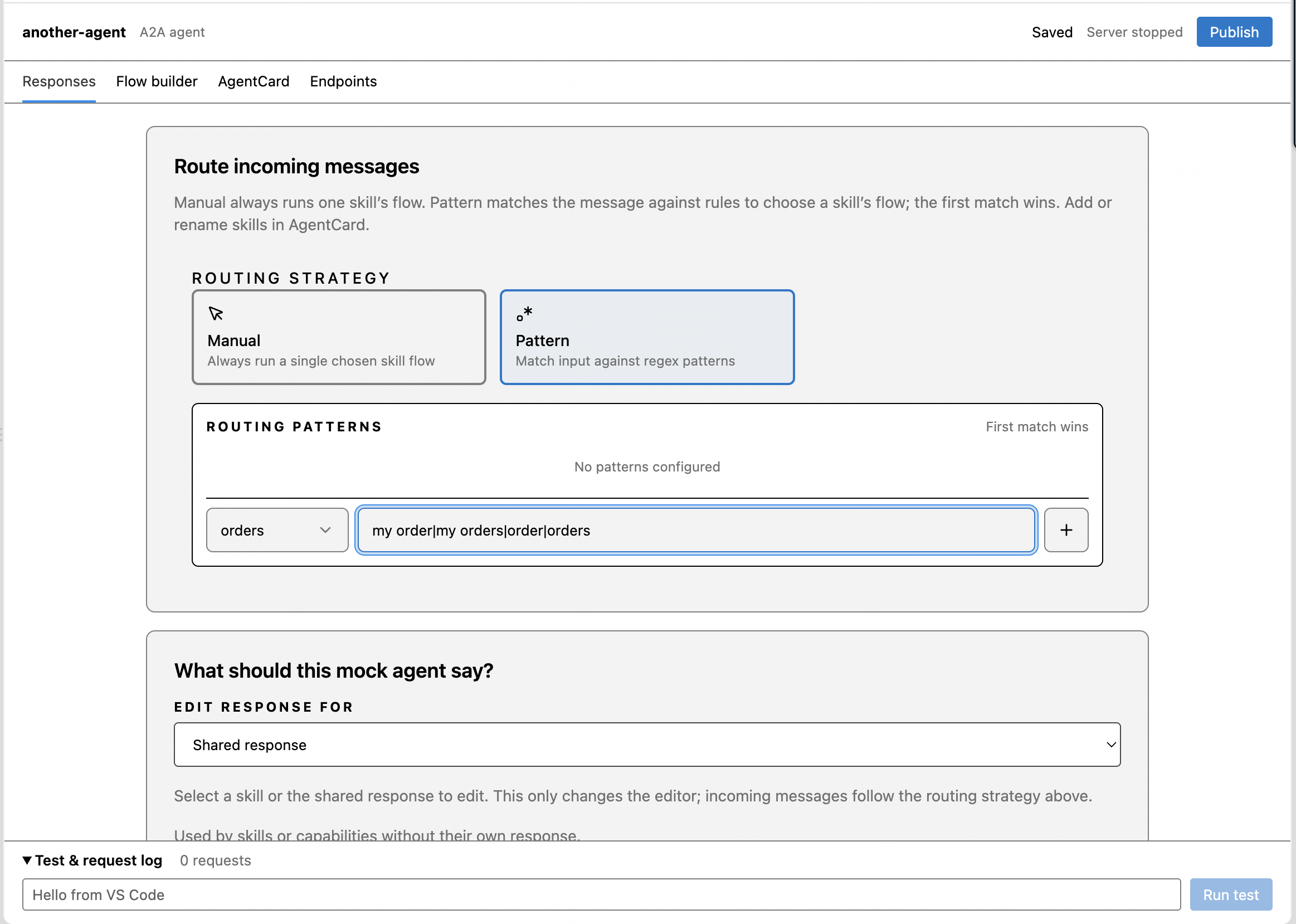
For A2A agents, Responses → Route incoming messages → Routing Strategy selects the flow to run. Manual always selects one skill; Pattern matches messages against regular expressions in priority order. For example, route weather|forecast to Weather and help|support to Support. Routing changes auto-save; invalid patterns remain editable. The Edit response for dropdown below selects the response you are editing and does not change routing. Add or rename skills in AgentCard. MCP requests select capabilities by their tool, resource or prompt identifiers.
Conditional replies check rules in order; the first match wins. Combine ALL or ANY conditions, specify a reply for each rule, and add an Otherwise fallback. Agent rules include Try a message, an offline draft preview with a two-second timeout. The preview does not apply routing or simulations. MCP rules compare tool or prompt arguments serialized as JSON, or the requested resource URI. Use Run test to exercise the running mock.
Valid rule edits auto-save. Incomplete fields stay editable and block switching targets/tabs or publishing until corrected. Changing the response type or replacing custom logic requires confirmation. Known response graphs remain editable as forms after visiting Flow Builder; custom graphs remain intact. Use shared response removes an override after confirmation. Existing mock IDs and cloud publishing paths are preserved.
Editor screenshots
The Responses editor combines routing and response rules:
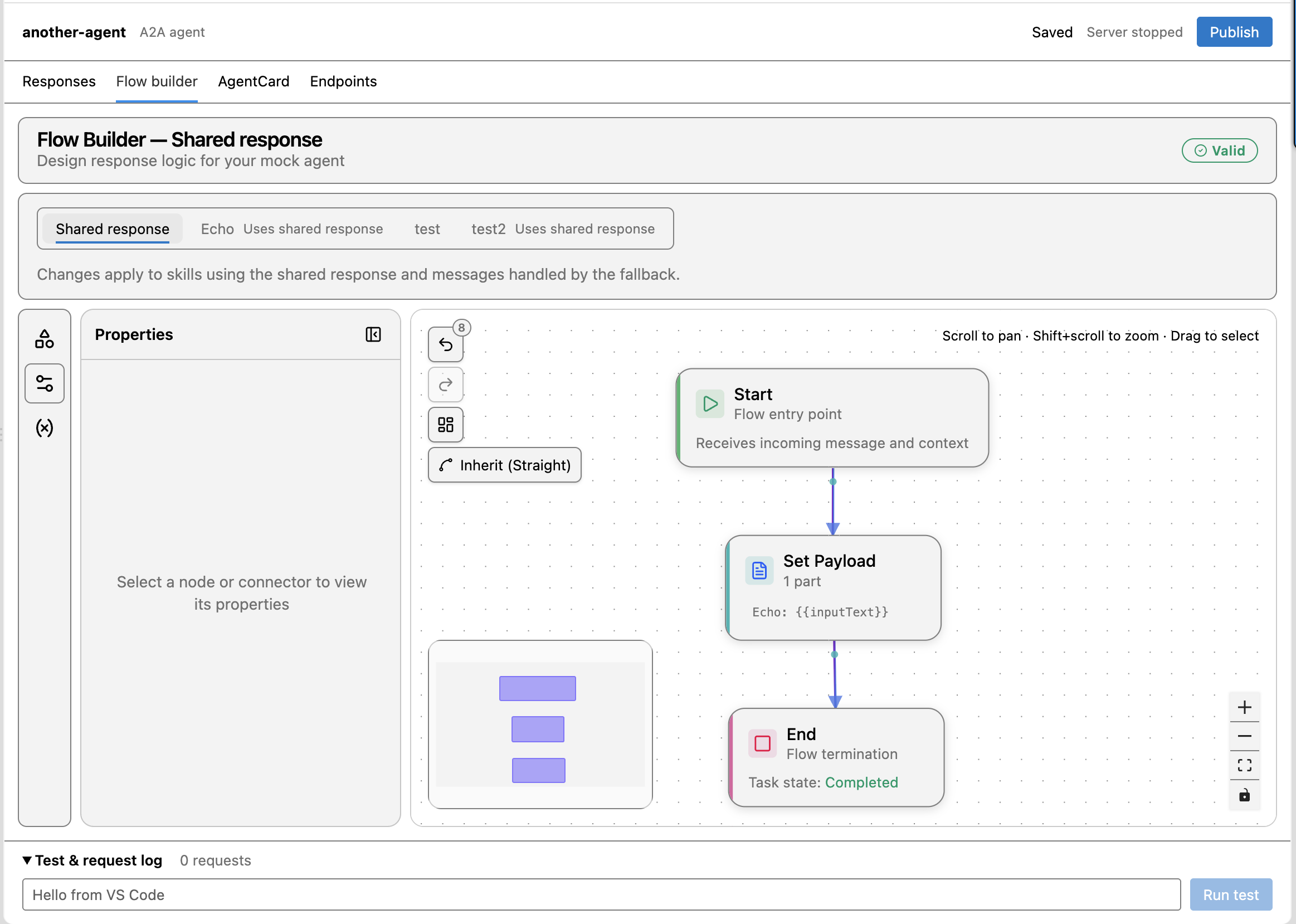
The Flow Builder can also define a shared echo response:
Settings and a fixed port
Select the Settings gear in the Agent Explorer sidebar, or run Agent Explorer: Settings from the Command Palette. This opens the extension’s settings page in VS Code.
Set Agent Explorer: Port to a fixed value such as 4310 for predictable URLs starting with http://127.0.0.1:4310. All local mocks share that port. Choose the Workspace tab to save the port for the current project, or User to set your default across projects. Workspace settings override the user default.
The default value 0 automatically selects an available port. A fixed value is retained across server restarts and VS Code sessions. If the server is running when you change it, Stop Local Server, then Start Local Server to apply the new port. An occupied port reports an error; switching to an available port requires your explicit choice.
One port and window-owned lifetime
All enabled mocks share a loopback listener. Agent Explorer: Port defaults to 0, which selects an available port. Pin a port for a stable local configuration; an occupied pinned port reports an error. Disable individual mocks from their context menu, or stop the shared server.
Closing or reloading the owning window stops its worker and active flows. Restart is explicit. Files persist, while runtime tasks and request logs are transient. Workspace Trust is required for runtime execution and cloud writes. With a remote extension host, loopback refers to that remote machine; automatic forwarding is not verified. Browser-only vscode.dev is unsupported.
IDs and endpoint paths
IDs are created offline and preserved during cloud publication and download. Renaming changes the display name, not the endpoint. Switching environments changes only the base URL, including scheme and port.
| Purpose | Path |
|---|---|
| A2A 1.0 | /api/mock-agents/<id>/v1.0.0 |
| A2A 0.3 | /api/mock-agents/<id>/v0.3.0 |
| AgentCard | /api/mock-agents/<id>/.well-known/agent-card.json |
| MCP | /api/mock-mcp-servers/<id>/mcp |
| MCP discovery | /api/mock-mcp-servers/<id>/.well-known/mcp-server.json |
Versioned AgentCards are also available beneath each A2A version endpoint. Discovery URLs are rendered for the current environment.
Publish, download and update
Run Connect Cloud Account and provide a key from Settings → MCP access on Agent Explorer. The extension connects to Agent Explorer automatically; no cloud URL is needed. The key requires View mocks, Create mocks, and Edit mocks permissions. See Management MCP access. Credentials are stored in VS Code SecretStorage, never in mock files. The deployment must support portable definitions and caller-supplied IDs from this release. Browser OAuth is not implemented; it requires registered client/callback configuration and deployment verification.
Publish Mock creates the hosted copy with the local ID and selected personal/team/workspace destination. New endpoints are public by default. Later publications update the same hosted copy, retaining its ownership, activity and invocation-key protection. Revision conflicts stop the update; use Compare With Cloud and Pull Cloud Changes to resolve them. No automatic merge or force overwrite is performed.
Download Cloud Mock creates a local file with the hosted ID. Local requests do not require the hosted invocation key; the cloud copy's key requirement is unchanged. Disconnecting leaves downloaded mocks usable offline. Download never silently replaces a local copy with the same ID. Pull protects dirty documents and asks before replacing saved local changes.
For an existing cloud ID without local publication metadata, Link Existing Cloud Copy shows a diff and explicitly establishes the association. Interrupted writes retain an exact request for safe retries with the same definition and credential. Definitive validation or permission failures can be corrected and retried.
Compatibility
Local execution supports deterministic flows, A2A 0.3/1.0 JSON-RPC including streaming and task operations, and MCP tools/resources/prompts with validation. LLM-dependent mocks, local push notification delivery, HTTP+JSON bindings, public tunnels and background hosting are outside this release. Unsupported definitions produce compatibility errors before transfer. Legacy hosted mocks without explicit default flows must configure one first. Documents and management requests are limited to 256 KiB; retained request logs are bounded.